


Staff

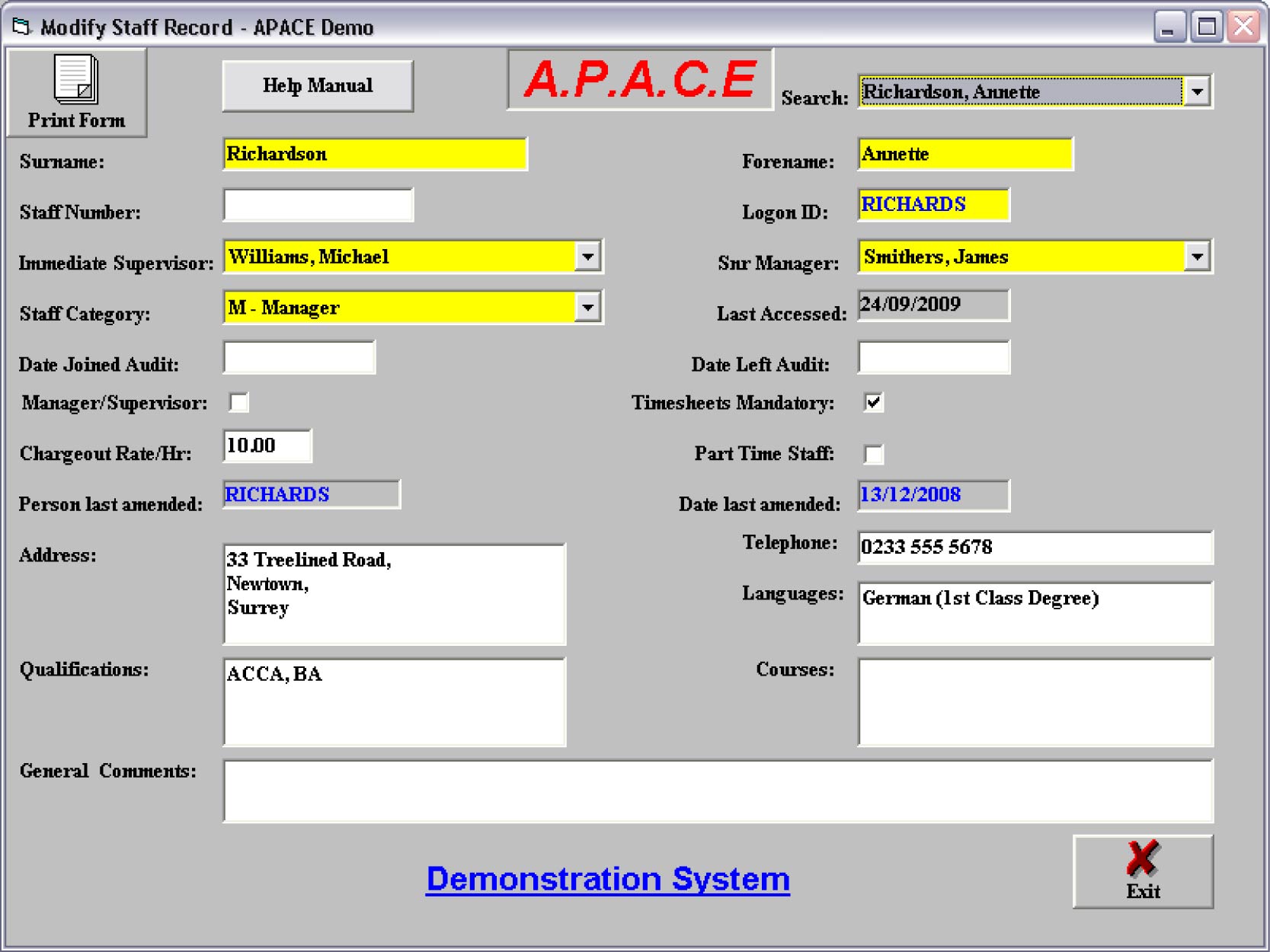
All staff must be recorded on the system. This will normally be the responsibility of an administration section. The key staff details fields are Logon ID number, Immediate Supervisor, Senior Manager, Staff Category, Date Joined and Date Left. The remaining fields are for information/reference only.
The key staff fields are as follows:-
- Logon ID is the unique identification of that user to the system. When each user logs on to the system, his/her ID can be picked up from the LAN (via a USER$ parameter in their Login script). If this is not possible to encode, then the user will be requested to enter their Logon ID by the system. The Logon ID is limited to eight characters and is not case sensitive - it will actually be shown in upper case when next viewed. This input Logon ID is matched against the corresponding field in the staff database. If the Logon ID doesn’t match, an error is reported and the user must enter it again. There is a password associated with each ID which will be requested as soon as a match to the Logon ID is found. The password is not shown on any screen – initial, one time only, passwords are set by the Administrator.
- Immediate Supervisor and Senior Manager are selected from a manager list. The Immediate Supervisor on the LAN version will receive notification that their staff’s time sheets are ready for authorisation.
- Staff Category provides the categorisation by which staff are organised in the department.
- Manager Flag determines whether that person will appear on all management drop-down lists.
- Time sheet Required Flag determines whether staff are reported in the Performance Statistics as having standard hours or not. Staff with this button not selected are not obliged to fill in complete time sheets, or indeed any time sheet. If they do enter part time sheets, these are checked, but the member need not conform to the full balancing disciplines. As each new member is added to the system the default value is that time sheets are required.
- Date Joined and Date Left are used to restrict the time sheet periods available to users, and they provide the limitations to the Performance Statistics’ analyses of staff.
- Charge out Rate/Hour can be left if you do not require costed reports (when it will default to 0.00); otherwise enter the hourly rate.
- Part Time Staff and Part Time Hrs/Week. These fields allow you to define part time staff. The system will recognise this in time sheet creation (when it will project part time hours - which you can amend), modification and authorisation. The ultimately authorised part time standard hours are then used in Staff Performance Statistics instead of the Standard Hours.
There are six reports available within this section …
- Staff Details – Abbreviated Listing. Provides one line summarised information for selected staff.
- Staff Details – Full Print. Provides a list of the total information entered for the selected staff member(s).
- Extract to Access. Extracts full staff details to an Access 2000 database where you can create your own reports.
- Staff Performance Statistics. This is a key staff management report as it will analyse the time sheets for selected staff and selected periods and provide statistics on time worked, standard hours workable, flexi-time, productive time, unproductive time and productivity percentage.
- Analysis of activity – specific staff member. Again a key management report, as you can analyse staff activity for the selected period either chronologically or by phase within job.
- Analysis of own activity. This report should be made available to all staff as it allows them to analyse only their own activity as in the previous report.